Google Ads Optimization Score is, largely, meaningless.
Contrary to its name, the Optimization Score has nothing to do with how well your campaign is optimized. In fact, by applying some of the recommendations that increase your score, you could inadvertently hurt your campaign performance and waste money, especially at lower budgets.
So, what is this so-called score and why should you ignore it? Here’s what you need to know.
What is Google Ads Optimization Score?
Google Ads Optimization Score is a reflection of how extensively you’ve applied Google Ads recommendations. It is not a measurement of actual campaign performance or potential, but rather a point-based, psychological incentive to follow Google’s often-misguided campaign advice.
Google’s official (misleading) definition

In Google’s documentation about Optimization Score, it defines the score as “an estimate of how well your Google Ads account is set to perform.”
But that’s not really accurate, either.
Optimization score is more of a measurement of your compliance with Google’s recommended practices. This compliance is disconnected from your actual campaign performance and your return on ad spend. Each recommendation is weighted by percentage points in terms of its perceived value to Google, not necessarily the value to you, the advertiser.
Why is Optimization Score meaningless?
A few reasons to start:
- The score is not really a score. You can get a 100% optimization score by simply dismissing the recommendations. (Yes, really.)
- Applying the recommendations is not “optimizing” anything. It’s merely increasing your artificial score as you give more control to Google.
- Some recommendations can be flat-out wrong, based on faulty interpretations of your campaign implementation. (See example #5 below)
- An extremely well-performing, profitable Google Ads campaign can have a low Optimization Score (and vice versa).
- Google’s “optimization” recommendations are not always in the best interests of the advertiser.
Wait, why would Google give bad advice?

Yes, it sounds counterintuitive – but as I explain in another post, Google Ads recommendations are often misguided, because they are largely designed to eke out as much spend as possible from each advertiser (often in granular ways that help Google maximize its revenue at scale across all accounts).
Here are just a few ways that Google’s recommendations can be detrimental to your campaigns:
- Unnecessarily increasing your cost per click
- Wasting ad budget on unwanted or irrelevant search terms
- Placing your ads in spots that are less likely to convert
- Automating your campaign in ways that give more control to Google
Let’s look at a few examples
Here are some common recommendations that can increase your Google Ads Optimization Score but also hurt your campaign performance.
1) AI Max Recommendation
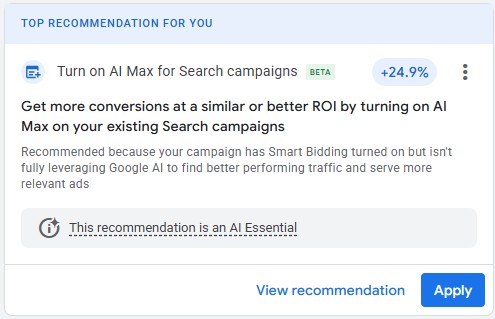
This recommendation looks important because it adds a whopping 24.9% to the Optimization Score! Also, “AI” is smart, so it must be good, right? Unfortunately, not in this scenario. AI Max is a big “no” for many advertisers. It’s often referred to as “broader than broad-match” because it can target searches that have extremely low intent based on miscellaneous text on your website (even when that text has nothing to do with the products/services you want to advertise).
End result: wasted ad spend.
2) Display Network Recommendation
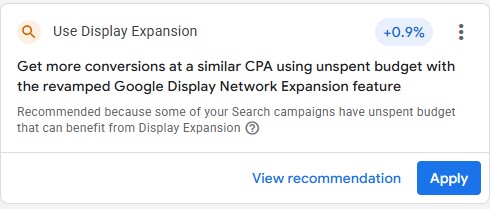
Despite the “revamped” label,” Google’s Display Network is still a waste of money for most small-business advertisers (and it’s prone to bot traffic that can artificially inflate your conversions). When you enable Google’s Display Network, your ads can appear on millions of other websites and mobile ads, where the clicks are cheap and often worthless. In recent benchmarks from Wordstream, the average conversion rate in Google Ads is close to 4% for Search and only 0.77% for Display (and that figure almost certainly includes bot-driven conversions across all industries). Display is generally not worth the expense except at larger budgets.
End result: wasted ad spend.
3) Broad Match Recommendation
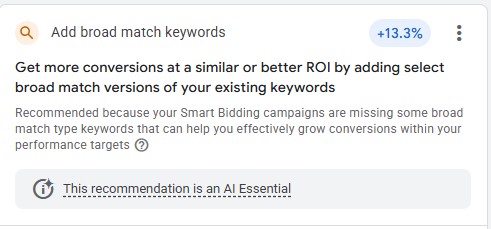
Another “big” one, seemingly: applying this recommendation would increase this account’s Optimization Score by 13 percentage points! Should you apply it? Nope, probably not. For many advertisers, using broad-match keywords will waste money on low-value (often irrelevant) searches, especially in highly competitive industries. Sure, there are plenty of reasons to test broad-match on a limited basis. But you absolutely don’t want to switch all your keywords to broad only for the purpose of increasing your Optimization Score.
End result: wasted ad spend.
4) Sitelink (CTR) Recommendation
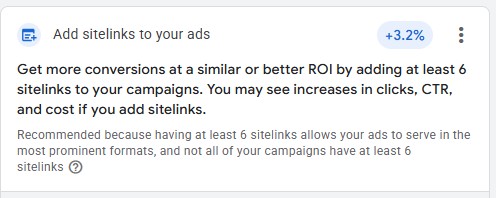
To be fair, adding sitelinks is pretty harmless. This example is more about CTR (click-through rate). As Google notes, adding more sitelinks can give your ads more prominence and thus increase your CTR (click-through rate). But do you always want a high CTR? Not necessarily. For many of my clients (especially in competitive industries), our objective is to prevent unwanted clicks that are less likely to convert. We do this by adding qualifying copy to the ad, such as pricing or terms like “Premium,” etc. These tactics will naturally lower CTR, and that’s exactly what we want if it helps increase conversion rates and return on ad spend. Also, keep in mind that a more prominent ad also comes at a cost: you will generally pay more for that click, increasing your CPCs.
Takeaway: Google’s recommendations are often at odds with your own strategy for conversion rates and cost efficiency.
5) Images Recommendation
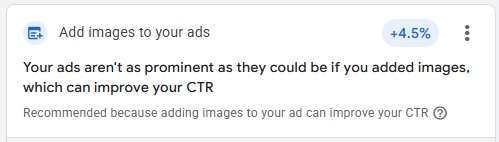
I’m including this example not because images are bad. (You should add them.) It’s because this recommendation is just wrong. In this particular account, we already have images added at the ad-group level (because, for this campaign, it’s critical that each ad group has its own relevant images). This Optimization recommendation is appearing only because we aren’t using images at the campaign level. It’s simply inaccurate.
Takeaway: Don’t believe everything Google tells you.
But, what if you have literally no idea what you’re doing?
I get it, it’s scary, especially if you’re a newb.
And that’s kind of the point, unfortunately. A low Optimization Score makes you think you’re doing something wrong.
Recently, one of my clients – a limo company in LA – contacted me in a panic. “Google says we dropped 40 percent!” he said.
I didn’t understand what this meant at first. But after some back-and-forth, I gleaned he was referring to his Optimization Score in Google Ads. I assured him that everything was fine and that the score was meaningless. Meanwhile, his campaigns were pumping out calls and bookings at CPAs of only $20 in a highly competitive metro market. His campaigns were doing phenomenally well (and I’ve managed Google Ads for many limo companies, so I would know).
But again, I do understand the fear of not following Google’s advice.
If you’re a total Google Ads newb, my advice:
- Take the time to educate yourself about Google Ads – not just Google’s “best practices,” but how it works and what each campaign setting does.
- Think strategically about how to leverage those tools to target your prospective customers by keyword alone, to start.
- Start with a Search campaign. Don’t bother with additional campaign types yet (and maybe never).
- Turn off all auto-apply recommendations. Be skeptical of the default settings.
- Yes, read Google’s recommendations carefully. Understand them fully. Then, feel free to dismiss them, unless you’re absolutely certain how they will affect your campaign.
- If it’s too overwhelming or doesn’t make sense, hire a professional.
Are any Google Ads recommendations good?

It depends. In my experience, the best recommendations are those that encourage you to switch to a conversion-based bid strategy (or value-based), as long as your conversion-tracking is set up properly.
Some recommendations may also point you to additional assets that you can add or other tools to leverage. But just be sure you understand how each recommendation will actually affect your campaign. Instead of applying those recommendations directly from the recommendations page, consider adding them manually in your campaigns, so you have even greater control and insight into their impact.
Frequently Asked Questions
1. What is a good optimization score for Google Ads?
A “good” optimization score does not exist, because the score is not a true reflection of campaign optimization. Rather, it is a loose, point-based push to apply Google’s recommendations, which won’t necessarily improve your performance but instead might hurt it. You can achieve a 100% score by simply dismissing all the recommendations.
2. How to see optimization score in Google Ads?
Go to Campaigns > Recommendations. Optimization Score is shown at the top of the page.
You can also see your Optimization Score as a column in campaign view. But remember, this score is not really a score. It’s an arbitrary metric designed to convince you to apply Google Ads recommendations (which might not be a good idea for your campaigns).
3. What is the difference between Quality Score and Optimization Score?
Quality Score is a diagnostic metric that rates the relevance of your ads, keywords and landing page in relation to a user’s search term. Optimization Score is a loose measurement of how many Google Ads recommendations you’ve applied. Neither has a direct impact on your campaign performance, but of the two, Quality Score can be a more helpful indicator of potential improvement in your campaign and website.
Conclusion
The Google Ads Optimization Score is misleading. It does not reflect whether your campaign is optimized in any way. Rather, it only guides you to apply recommendations that could have a negative impact on your campaign. Take the time to understand what each recommendation is proposing and how it will actually affect your campaign strategy or results. Then, feel free to dismiss the recommendation or apply it at your own discretion.
Need some help?
If you need help to truly optimize your Google Ads campaign (rather than merely inflating the artificial Optimization Score), fill out this form and I’ll email you pricing and an overview of how I can help.

![How to Use Google Ads for Limo Services [Updated 2026]](http://marlinsem.com/wp-content/uploads/2024/01/limo-company-advertising-google-ads-2025-500x383.png)